Monday marked the end of my technology integration class. It was a bitter sweet day because it meant that I got to start my first ever teaching block, but it also meant that I had to say goodbye to yet again another great teacher who provided so many great ideas and resources. During class, we reviewed our peers genius hour ted talks and their online profiles. The creativity in my class is phenomenal, and I could tell the topics that were chosen were real passions of my peers.
As I reflect on the entire semester in my tech class, I cannot believe how comfortable I have grown learning new ways to integrate technology into the classroom. My associate teacher for my first teaching block is really passionate about integrating technology into the classroom. I decided to wait a couple days to reflect on my technology class experience until after I have had a few days in my classroom so I could reflect on how much I have learned and acknowledge how I can apply the knowledge into this classroom.
Retrieved from: http://bit.ly/2fBzixd
The first thing that my associate introduced me to is classed Planboard. Planboard is designed by Chalk.com which allows teacher to upload their class schedule and daily lesson plans. This website also comes in an app that sync together allowing you to have your schedule on any device. I found this really helpful because you can have any pictures or videos that you plan on showing your class directly on plan board. Then during the lesson you can click on the link and it will take you directly to it. If lesson plans need to be uploaded from a word document from the computer it can also be uploaded to planboard. Or you can print all the documents and plans from each day in pdf form. Another interesting feature that Planboard offers is called markboard. This allows any class assessments to be online under each subject being taught. I think this is a really great tool that can help with 21st century technology learning in the classroom. It provides a medium for teacher to use technology at their finger tips and shows students how technology can be used for more things than just games.
I am so excited for my teaching block and to experience things like Google Classroom and Plickers in action! I think it will be such a huge learning experience and I cannot wait to share what I have learned!!
Today when we stepped into class, instead of jumping into a hard activity that required a lot of thought our teacher decided to keep it light and fun. The past couple of weeks have been busy with assignments and test as we wrap up our last two weeks of class before our block 1 placements start. Out teacher told us as our starting tech activity was to create a meme.
Our job was to find an inspirational image using google, flickr, or search through the various links this blog post provides. I went through the article and found a cite called free media goo to find my photo. All the websites in the blog post consist of pictures that are royalty free with no words. Perfect pictures to create memes or use in the classroom for various reasons such as language arts. You could use the pictures to have the students create a story about what they might think was happening before, after, or during the picture, Media Literacy all the way!
Once I chose a picture, I used PicMonkey to edit the photo. I added a filter and words, The quote I chose reflects a saying that I like to remember and live by constantly. I think this quote is also important to remember during the fall when the world is transitioning into Winter, which can cause seasonal depression for some people. As well, since today is Halloween, a lot of people consider November 1st to be the first day that Christmas can start. I have experienced that during the holiday season society can get so wrapped up in the idea of the season and the hustle and bustle of getting presents for everyone that they forget the meaning behind Christmas, or any Holiday in December. I think this meme is only appropriate for today as people start to gear towards Christmas and the Holiday season.
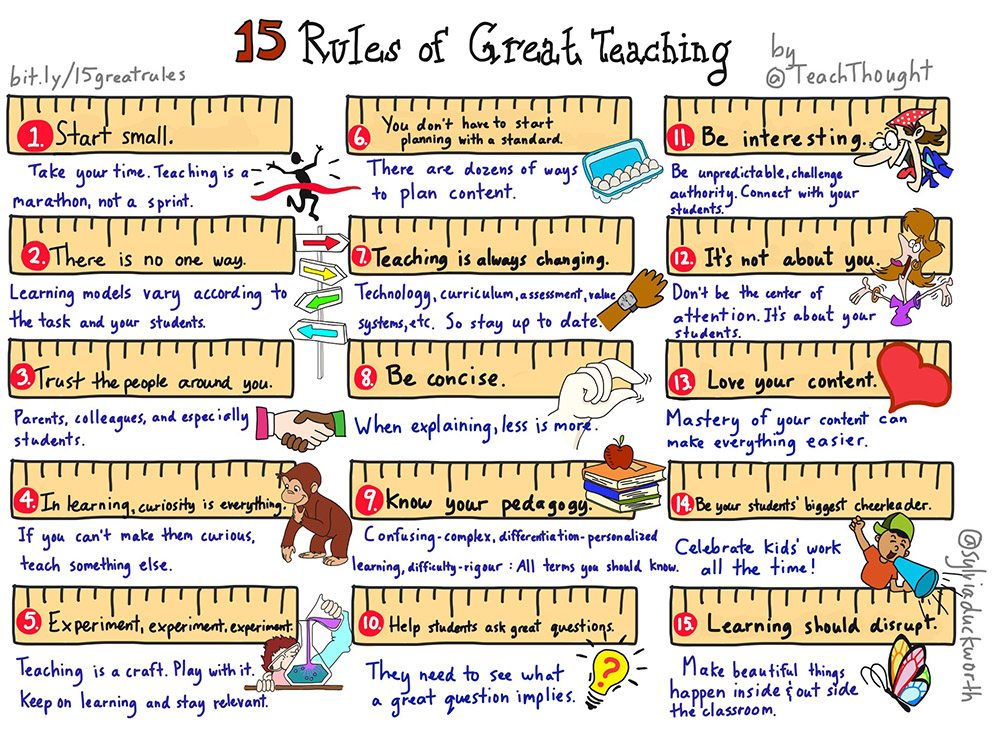
This week as one of our class actives, we are required to find a online article from The Best of Ontario-Educators Daily. This online daily newspaper is created by Doug Peterson who has a large online presence when it comes to teaching resources. The article that I chose to use for todays activities discusses the 15 Rules of Great Teaching.
I found this article to be very interesting to read through. I like it because it's a good reminder to us as teacher candidates to not get so overwhelmed with the demand of the curriculum and to remember those specific ideas of planning with a standard in mind.
The rules that are outlined in this article are:
http://bit.ly/1T6Ak2Z
1. Start Small
--> Definitely important because it helps us to understand that we don't have to have everything perfect from the beginning. Starting off slow allows the students to find goals that will be attainable.
2. There is one one way
--> Important to remember because it every students has their own ideas and learning styles
3. Trust the people around you
4. In leanring, curiosity is everything
--> I find this one in particular important because I am such a strong believer in what students can learn from inquiry and passion based learning. Learning through this style of teaching allows students to learn by doing and see first hand how something is affected or crated.
5. Experiment, experiment, experiment
6. You don't have to start planning with a standard
7. Teaching is always changing
--> Another important concept. There is always new research and innovative ways of teaching. There is never a dull moment in the world of teaching, those who love to teach love to learn!
8. Be concise
9. Know your Pedagogy
10. Help students ask great questions.
--> If you are going to teach using curiosity how do expect students to learn anything if there are no probing questions to guide and facilitate their learning?
11. Be interesting
--> There are so many resources, there is no excuse for simple boring worksheets
12. It's not about you
13. Love your content
14. Be your students' biggest cheerleader
15. Learning should disrupt
These are all great 'rules' to keep in mind as we are about to head into our teaching Block 1!
Genius Hour Update/ Weekly Class Reflection
This week in class other than the learning objective we also discussed multiple different ways of using the web in our classroom. One really interesting one that could be used for teaching students about synonyms. The tool that could be used is Wordle. Here is an example of a wordle that I created about my genius hour topic.
Another activity that we created for class this week was a trailer for our genius hour. I really enjoyed making this video in iMovie. iMovie was very easy to use because it has templates available that allows you to change the words and customize it without starting completely from scratch. Check out my video!!!
This week for my tech class I researched further into my genius hour project. However this week I found it in particular hard to research. While balancing other classes, having an assignment that seems like you're not doing homework can be hard to wrap your brain around. Even though balancing going to class, being on the varsity rowing team, and assignments, I did find some very interesting news articles from the Toronto Star newspaper.
The first News article that I found discussed how a parent was angry that their child's lunch had been taken away because there was food in it that was consider 'unhealthy'. The parent was angry that the teachers were regulating the type of snacks parents were sending their children. The mom's response to this was, how does the teacher know that my child didn't have a healthy breakfast or that she is planning a healthy dinner that night. The mom's point about having food so regulated in the school is very valid. Another article by the Toronto Star also outlined how the school board takes necessary processions to keep their students safe, according to Sabrina's Law. However, a point that the school board pointed out was they cannot restrict all foods children are allergic to. For example many fruit allergies, such as to apples, are simply intolerances that only cause problems if the food is ingested. The school board outlines that there are allergies that can cause allergic reactions with airborne proteins. I learned that this is why schools have created peanut free zones. The proteins in peanuts can cause airborne anaphylaxis.
Even thought this week I may have not done as much research as previous weeks, I still found very valuable information! I found information that helps to explain more about why schools have peanut free zones in particular versus creating restrictions on every other food allergies that may be present in the school. I also found a video by the Kid President that I found very inspirational this week to keep pushing through all my homework and finding more information about my genius hour project. Check the video out!
Today in class we discussed various ways that we could use technology when assessing our students. We discovered two new ways: Plickers, and Google Forms. In other classes, I have used google forms being a student answering questions and filling out self-evaluation forms. Seeing the inner workings of a google form post was fun!
Google Forms Google Forms is a great way to give students some homework and then getting immediate assessment when they complete the form. Within Google Forms, you can embed videos, pictures, create multiple choice questions, short answer, long answer etc. It definitely allows for variety and versatility.
-Under the Google Waffle, it is a 'Google Drive' option.
-Then you can add a title of the document
-A question could be required such as a name if you want to know who completed that specific form
->There is a special slide button that will make the specific field required.
-There are also drop down menus to determine the type of question you want to ask.
-An answer key can also be added. (At the bottom of each question there is an 'answer key' button which will allow you to put in the answer. It will only work well for multiple choice or true and false type, one word answer questions)
-When the form is complete, clicking the 'eye' at the top right corner of the page will bring you to the 'Live version'. This is what it would look like for the student's point of view.
When students have completed the form, as the admin of the form you can go to the Edit mode. Then click on the responses tab. Then by selecting the free icon, a Spreadsheet will be created with all the students' answers to each question. To help assess the answers efficiently, at the top of the spreadsheet there is an 'add-ons' option. Scroll down until you read Get Add-on, then in the search bar find Flubaroo. To add, click on the blue +Free button. Then Select Allow to give permission to Flubaroo.
To Mark using Flubaroo:
-Click add-ons and select Flubaroo
-The select Grade Assignment
-Choose the grading option for each question (then continue)
-Choose your answer key
-Now the test responses are marked and pie charts or bar graphs can be made from this data!
Plickers
This is an exciting new app that I discovered today. This allows some technology to be used in the classroom, but does not require students to have access to their own device. The teacher only needs a smartphone or a tablet. The app allows to student to anonymously show an answer or their opinion to something by holding up an 'encrypted' sign. It looks like the one on the left. Each card is different, similar to QR codes. Each side of the square has an A, B, C, or D label. Depending on the question the teacher poses the student holds their card facing a specific way with the letter they want to use facing the ceiling or on the top. Then the teacher uses the Plickers app on their device and scans across the classroom. Then the app registers all the student's answers and complies it into a bar graph. As a teacher you can have each picture attached to a specific child so that you know who answered what. Sometimes as the teacher you can also have it projected up onto the board for everyone to see the variety of answers, or you can keep it confidential for your knowledge only.
Check out this video for more information about Plickers!
Genius Hour Update
This weeks as I have been researching more about nut allergies, I decided to focus more on finding the biology. I was curious to know why certain people have allergies versus others. Here is what I found:
-Nut allergies are more prevalent in developing countries
-4-5% have severe life threatening allergies (Hourihane,
1997; Kurowski & Boxer, 2008) -It is a disorder with a person's immune system, which creates hypersensitivity towards the allergen (Plukett, 2010; Gillard, 2014) -When someone ingests a nut, their immune system incorrectly identifies the protein, and reacts accordingly. The person's body reacts with the immunoglobulin E (IgE) antibody (Gillard,
2014; Kurowski & Boxer, 2008; Edelstein, 2014; Patterson, 1980) ->IgE: mediator in the body during hypersensitivity reaction. It bonds to tissue and releases histamines. These histamines act like an alarm telling the person they ingested something wrong -allergic reactions are specific to the individual because the antibodies that are release occur in different places depending on where they are created in the bloodstream (Gillard, 2014) -Prusak et al. (2014) examined why there are different prevalence rates depending on the the geographic region. The study found that there are 3 different processes how how peanuts are handled. 1)Boiling 2)Frying 3)Roasting -Each way, the nature of the proteins change -While roasting (how America make peanut butter) the chemical compound in the nut changes because of the high temperatures used in the process
-Genetic makeup also plays a key role
-Plunkett (2010) found all allergies are common in urban locations.
-Genetic codes do not follow the Laws of Mendelian inheritance
->Mendelian's Law: genetic codes are passed through generation, allowing scientists to predict the genetic composition of a person
-Molloy and Hourihane (2008) suggests that if the mother of a child is atopic of there is family history of atopy, then the mother should avoid nuts during pregnancy and breastfeeding.
Sabrina's Law
-to protect children who have anaphylactic allergies (Bill 3, 2005)
-Requires all school boards to establish and maintain school environments to reduce the risk to anaphylactic agents
-All schools need a detailed steps and precaution for each child who has anaphylactic allergies.
Today during class a question was brought up about whether students should be required to have google accounts so we can have class activities using google docs etc. We thought about what age it is appropriate for students to have an account, or what we might do if parents are apprehensive about it. We learned that you can create an account called teacher@gmail.com. Then if you add "+" and then a number or students name before the "@" symbol then it will forward all emails to the original teacher account. This allows the teacher to screen all emails before the students can see them. I think this creates a level of security for parents and teachers who may be concerned about younger students having an email account.
If the I were to use this in my classroom, I would make the email for each student with a number. This would allow me to use if from year to year. Each student would change their password or I would create a password for each student every year. I love this idea of being able to create a class google email account to create collaborative documents. In class today we did an example of one by using google slides. During this activity we were required to take an image from a box and think outside of the 'box' (no pun intended) and create something new. I have attached the google slide show to see what our class created!
Genius Hour Update
This week I have really dived into my researching more about nut allergies. I have learned a lot more about nut allergies. I have learned more about my personal allergy too which is what I have found the most interesting.
Today while I was researching I was reading an article about peanuts particularly. The article discusses that people often misconceive that a peanuts is similar or the same as a tree nuts. But in fact, peanuts are grown under ground and are not really a nut but a legume. A legume is anything from a peanut, beans, soya, and peas. Ironically I was unaware about this until last summer when I discovered that I am allergic to peas and certain soya proteins that I have found in certain canned soup and gluten free crackers.
This week my goal is to find out more biology information, such as the type of proteins that are consistent throughout these foods. I also want to research more into the policy about schools and how they are trying to protect children. I have currently found a article and video describing one students experience of having to quit public school and become homeschooled because she had so many reactions at home. It's an interesting story, check out the video attached bellow.
This week in our tech class, we had the opportunity to make a video using Powtoon. We furthered our learning about Genius hour while making our Powtoon. This website is a great resource that can be used in many different situations. For example, another class I am taking this year we are required to create a personal literacy story using technology tell it. I was unsure about how I might go about doing this until today. Powtoon would be a great way to create a video while still hitting all the requirements of the assignment. Powtoon is also a good resource to implement into the classroom because it can allow students to put as much detail in as they would like. It provides them with freedom of expression, which I feel has been a big emphasis recently in our teacher education.
Here is the video I mad about Genius Hour on Powtoon:
Genius Hour Update:
This week to research on my own genius hour project about the emotional effects of nut allergies has gone pretty well this week. I wrote a research paper proposal for another class a couple years ago. I dug up that paper and reacquainted myself with the ideas and biology I found out about biology for the paper. I definitely think that the resources found for this previous paper will help provide background evidence for my genius hour project/ ted talk. This week my goal is to find some more resources online from school boards to provide information about their nut free zone policies. Can't wait to see what I'll find next!